
AI PRODUCT IMAGE WORKFLOWS FOR WORDPRESS
Create betterproduct images.Sell with confidence.
Generate, compare, refine, approve, and apply ecommerce visuals directly inside WordPress. Use your own AI provider account or choose the planned easy2plugin managed-credit workflow.
✓ WordPress native
✓ WooCommerce focused
✓ Review before apply
× BEFORE
Original image

✓ AFTER
AI-enhanced for ecommerce

Upload
Product image
AI Enhance
Generate variations
Compare
Choose the best
Apply
Use in WordPress
WordPress Block Theme
Editable without a page builder
Two Product Models
BYOK available; Credit in development
Media Library Ready
Approve and manage outputs
Built for Ecommerce
Single and catalog workflows
PRODUCT VISUALS
A flexible image workflow for every ecommerce category.
Use clear source photos to explore cleaner packshots, lifestyle scenes, campaign directions, and channel-specific crops—then verify every result before publishing.

Beauty & skincare
Clean packshots and campaign scenes

Home & living
Styled interiors and context images

Fashion & footwear
Catalog and lifestyle directions

Accessories
Detail-led product presentation

Food & beverage
Warm product-led campaign imagery

Electronics
Modern studio and gradient scenes
TWO PRODUCTS. ONE GOAL.
Choose how you want to access the AI workflow.
BRING YOUR OWN API KEY
Product Image Studio with AI
Connect a supported provider account that you control. Choose a Free, Standard, or Premium licence plan and pay provider usage directly.
- Direct provider account control
- Provider charges billed separately
- Plan-based workflow capabilities
- Best for teams that already use AI APIs
NO EXTERNAL API KEY
Product Image Studio Credit
The Credit version is currently in development. The planned service aims to let customers use the workflow without configuring a third-party AI provider key.
- In-development managed workflow
- No customer API key planned
- Launch details still being validated
- Public release timing not announced
PRODUCT REVIEW WORKFLOW
Review the
difference.
Keep the product.
Change the visual direction.
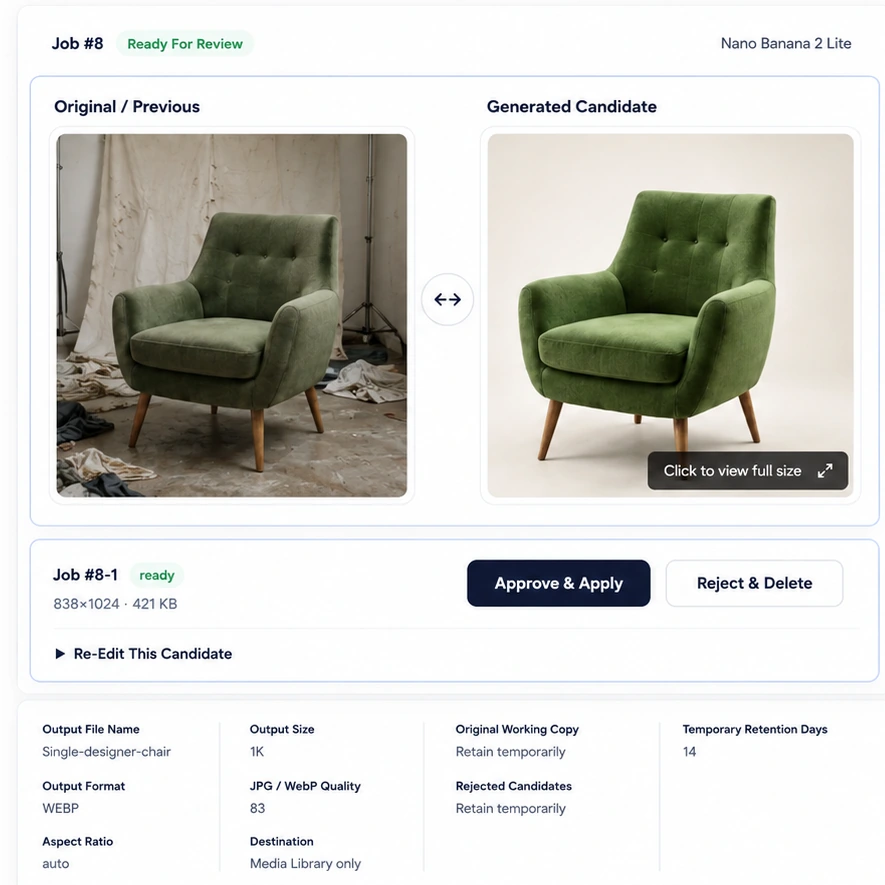
Every AI candidate is side-by-side with your original so you can spot the improvement, check the details, and approve with confidence.

Compare side by side
See the original and generated candidate together to evaluate accuracy.

Inspect every detail
Open the full-size view to examine the image up close.

Approve with confidence
Approve the best result, reject it, or re-generate until it’s right.

Built for speed. Designed for quality.
Review faster, reduce rework, and ship better content—every time.
HOW IT WORKS
From product photo to approved WordPress image in four steps.
01
Select images
Choose supported product images from WordPress, WooCommerce, or Media Library.
02
Choose direction
Select an Edit Mode, preset, supported references, or available prompt controls.
03
Generate candidates
Create candidate images and compare each result with the source product.
04
Approve and apply
Approve only the selected result and apply or save it through the supported workflow.
WORKFLOW CAPABILITIES
Control the details that matter in ecommerce images.
01
Generate and compare
Create one or more candidates, compare them with the original, and keep the strongest result.
02
Single and bulk workflows
Work on one product or prepare supported batches for a catalog update.
03
Edit Modes and prompts
Use repeatable presets, guided instructions, or plan-appropriate custom prompts.
04
Approve before applying
Generated candidates remain reviewable until an authorized user approves the selected image.
05
Re-edit and retention
Refine results and use plan-specific controls for original or rejected image retention.
06
WordPress-native workflow
Manage jobs where your products and Media Library already live.
QUICK COMPARISON
BYOK control or managed-credit convenience.
| Area | Product Image Studio with AI | Product Image Studio Credit |
|---|---|---|
| AI access | Your supported provider account | Planned easy2plugin managed service |
| API key | Required for the selected provider | Not required from the customer |
| Payment model | Licence plan plus provider charges | Planned prepaid credit model |
| Usage visibility | Provider account plus plugin jobs | Planned credit balance and usage history |
| Best fit | Direct provider control | Planned simplified centralized setup |
| Current status | Free and paid package structure | Planned product; details may change before launch |
PLANS AND CREDITS
Review the available BYOK model and the future credit direction.
BYOK LICENCE PLANS
Free, Standard, and Premium
Start with a usable Free version or choose a paid package plan for broader workflow capabilities. Third-party provider usage is billed separately.
MANAGED CREDIT VERSION
In development. Pricing coming soon.
The managed-credit version is not available yet. Credit packs, prices, validity, billing rules, and the public launch date remain unannounced.
PRIVACY AND SERVICE TRANSPARENCY
Know when product data leaves WordPress.
Installation alone does not generate an image. AI processing begins only after an authorized user initiates a supported action. Depending on the product and configuration, source images, reference images, prompts, settings, and technical request data may be sent to the selected external service.
FREQUENTLY ASKED QUESTIONS
Answers before you choose a product.
What is the difference between the two easy2plugin products?
The BYOK version connects to AI provider accounts controlled and paid for by the customer. The Credit version is a planned managed service that uses an easy2plugin credit balance and does not require customers to configure external API keys.
Do I need WooCommerce?
The products are designed for WordPress product-image workflows and are particularly useful with WooCommerce. The exact requirements of each released plugin package will be stated on its product page and readme.
Are generated images automatically published?
No. The intended workflow provides candidates for review. Store administrators remain responsible for comparing shape, color, packaging, labels, trademarks, and other product details before publishing.
Do credits always equal a fixed number of images?
No. Different models, output sizes, candidate counts, and operations may consume different credit amounts. The planned Credit version will show the applicable cost before confirmation.
Can every part of this website be edited?
Yes. The site is built with native WordPress blocks. Text, images, buttons, layouts, colors, spacing, fonts, header, footer, pricing cards, tables, and FAQs can be edited through the Block Editor or Site Editor.
Does the BYOK version require my own AI provider account?
Yes. BYOK means you connect a supported provider account that your organization controls and pays for separately. The planned Credit version is intended to remove that setup requirement, but it is still in development.
Where are approved images stored?
Approved images are saved through the supported WordPress and Media Library workflow. Product assignment and retention behavior depend on the selected operation and plan.
Can I re-edit a generated candidate?
Re-editing is available in supported paid-plan workflows. The interface should show the settings and candidate identity so users can refine a result without confusing it with another job.
What happens when a paid licence expires?
The commercial package is intended to fall back to the available Free-plan capabilities after licence expiry. Existing customer images should not be deleted merely because a licence expires.
Are AI-generated product details guaranteed to be accurate?
No. AI output can alter shapes, colors, labels, text, materials, and small details. Every candidate must be compared with the real product before approval and publication.
Can Shop Managers use the plugin?
Role access is plan- and configuration-dependent. Administrators can use the available role-access controls to determine which authorized WordPress users can operate the workflow.
Are source images or prompts sent outside WordPress?
When an authorized user starts an AI request, the necessary images, prompts, settings, and technical request data may be sent to the selected external provider. Installation alone does not generate or process an image.
CHOOSE YOUR WORKFLOW
Build a repeatable product-image workflow inside WordPress.
Compare the BYOK plan structure or review the planned managed credit packs.